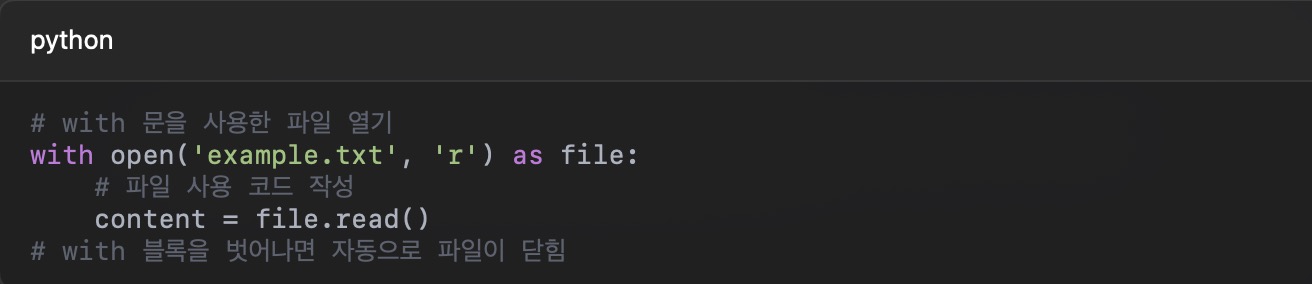
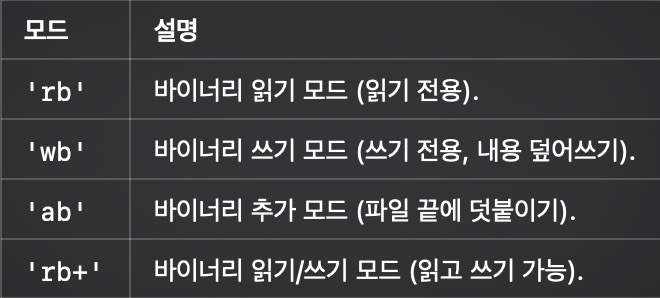
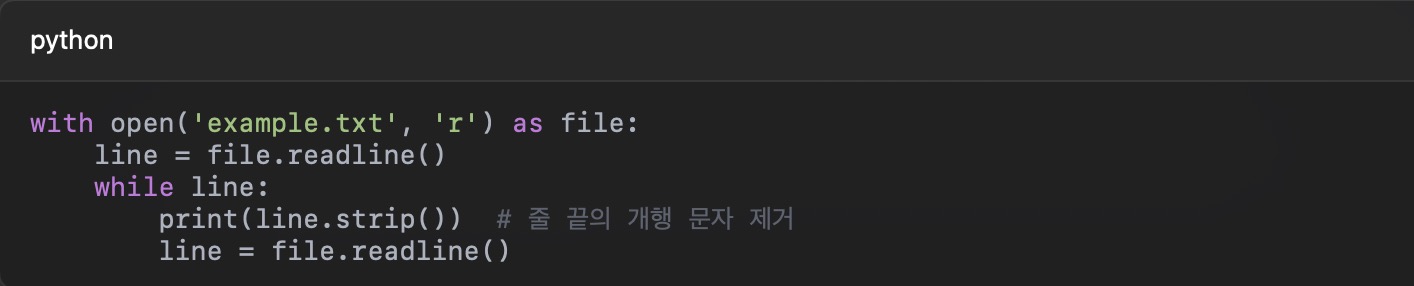
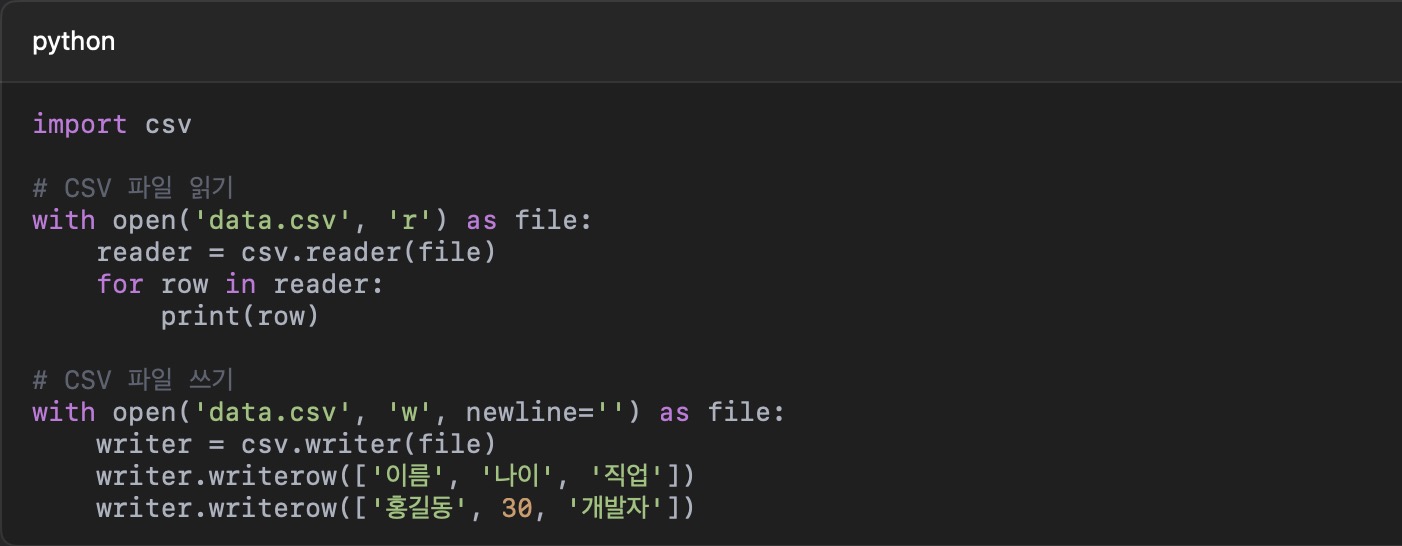
Prior to developing the chatbot, when using tokenizer in CoreML, there is a problem that it cannot be converted from the existing Python code.
CoreML has a problem because it receives a "number array" as input, and the "string" input cannot be converted. When converting a PyTorch or TensorFlow model to Core ML, only the weight and operation of the model are converted, and the tokenizer operates in Python code, so it is deleted without being converted.
Therefore, a temporary model was implemented to confirm whether the function of the kobert model was executed when converting the KoBERT model to the CoreML model.
Methods for converting the Kobert model into the CoreML model is as follow.
Why convert the pytorch model through ONNX instead of directly converting it to CoreML?
-> Because Open Neural Network Exchange (ONNX) translates models into intermediate formats, increasing compatibility across different frameworks! Core ML does not fully support the direct transformation of PyTorch models, so it can be transformed more reliably through ONNX.
PyTorch → ONNX → CoreML
[PyTorch Model] → (ONNX Converting) → [ONNX Model] → (CoreML Converting) → [CoreML Model], Run the Core ML model on iOS
Since mlmodel cannot be opened in Xcode, it is recommended to change it to mlpackage format and open it in an ios environment.In addition, when opening a file converted from Xcode, you should check whether the input and output sizes and types are the same. When the file was opened in Xcode, it was confirmed that int32, the data type of the input and output of the file, was not converted correctly. Since CoreML does not support int64 or int32, it unifies the input and output types as float32.
When the model of the project is completed in the future, it will be converted into CoreML in the same way as above.
Additionally, when I tried to open mlpackage through Xcode in an ios environment(iMAC 24), an outputSchema problem occurred.
The cause of the problem was that Bert_model's path was inaccurate.
I learned that it is necessary to double-check the code after changing the name of the folder or moving the data.
This project aims to create a chatbot that analyzes the user's emotions and conveys empathy and comfort in the way the other person wants. Analysis of the user's emotions is analyzed in two ways: text analysis and facial images analysis. Analysis through text aims not only to capture words representing specific emotions, but to infer the user's emotions by grasping the context. In addition, the method of treating according to emotions allows users to respond in the way they want, such as friends, parents, and lovers.
Key Features
-Text-based emotional analysis:It analyzes emotions by analyzing text input by the user.
-Image-based emotional analysis:analyze the facial image image image that the user posted by analyzing the facial image.
- Provides response to customized comfort:Based on the analyzed emotions, the user responds with the desired type (EX/parents, friends, lovers, etc.). - Personal custom:Continuous conversation analyzes minor patterns in individual texts, images, etc. to derive more sophisticated responses.
Model Implementation
The text recognition model and the image recognition model are distinguished and implemented respectively. In the initial plan, the text dataset and the image dataset were combined to be implemented as a single dataset, but due to the problem of data size mismatch, the model that recognizes text and images at the same time was not immediately implemented, but after implementing the text recognition model and the image recognition model respectively, it was decided to create a recognition model by combining them.
The text recognition model implementsNLP (natural language processing), especially after analyzing the morpheme of Korean, grasping the context, and inferring emotions.
KoNLpy is used for Korean morpheme analysis. In the preprocessing process, the dataset is divided into training, validation, and test sets and calculated at a ratio of 8:1:1. The training text dataset, which has been preprocessed through NLP, is applied to the LSTM model to proceed with training, and tested with the test text dataset, which is tested 20 times with epoch=20 and the performance of the model is gradually improved. The performance of the model is judged based on Accuracy. The performance of the model is aimed at Accuracy Score 0.90 or higher, and if the baseline score is not met, the model is gradually improved through hyperparameter tuning.
The image recognition model is largely divided into a training set and a test set in the entire dataset, and 80% is trained and 20% is prepared as a verification set in the training set. Each training, verification, and test set are calculated at a ratio of 3.2:0.8:1. Each prepared dataset was preprocessed through data augmentation and normalization. The preprocessed data is applied to theEfficientNetB0model to proceed with training, and the test is performed with a test image dataset, and the performance of the model is gradually improved by testing it 20 times with epoch=20. The performance of the model is judged based on Accuracy.
Combining the two completed models, we implement one recognition model and test it in CoreML by adding other features.
Technical stack and development environment
Programming Language: Python
Text Emotion Analysis Model: KoBERT (Korean BERT) (Context-based Emotion Analysis), LSTM + Word2Vec (Current Neural Network for Emotion Analysis)
Data processing: Numpy (multidimensional array and numerical operations, optimization of vector operations of emotion analysis results), Pandas (storage and analysis of emotion analysis results in data frame format, emotion analysis evaluation and statistics processing), Tensorflow (training and optimization of text emotion analysis models, building CNN models for image emotion analysis)
Development Tools: Jupiter Notebook
Expectation Effectiveness
It provides customized comfort services through emotion analysis and can be used for various services dealing with emotions (psychological counseling, etc.).
After completing the data preprocessing, I will now document the architecture of the model I built.
model overview
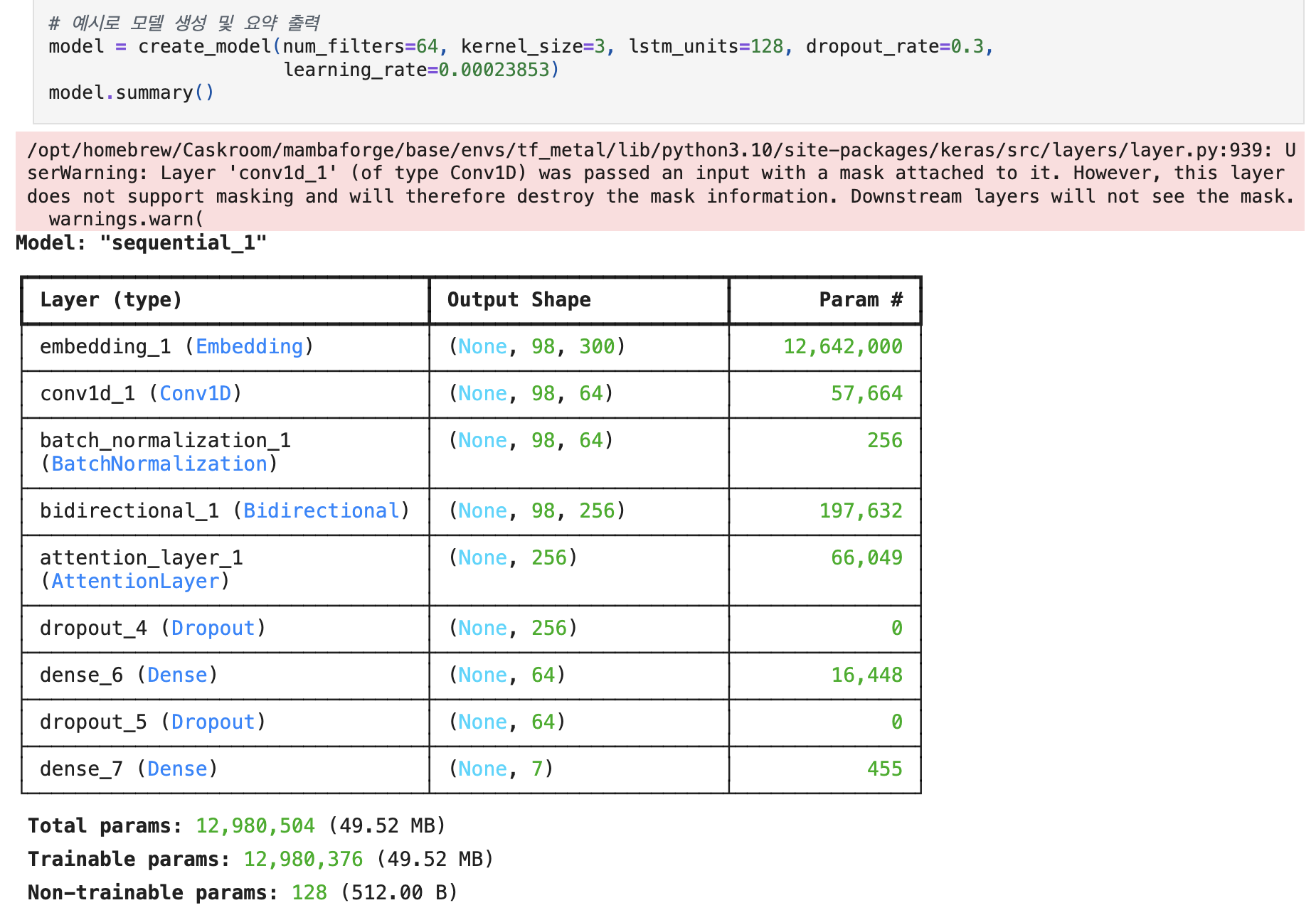
The model used for text-based emotion classification follows a CNN + BiLSTM + Attention architecture.
This structure was chosen because it captures not only the sequential characteristics of a sentence but also local patterns, making it well-suited for emotion analysis.
CNN (Convolutional Neural Network)
The Conv1D layer is used to extract local features by capturing consecutive word patterns in a sentence—essentially n-gram information, such as emotion-related expressions that appear in groups of 2 to 3 words.
By setting the kernel size to 3 (kernel_size=3), the model is trained to detect patterns at the 3-gram level.
BiLSTM (Bidirectional Long Short-Term Memory)
A bidirectional LSTM is used to capture both the forward and backward context of a sentence.
With return_sequences=True, the output at each time step is preserved and passed to the next layer, allowing the Attention mechanism to make use of the full sequence information.
Attention Layer
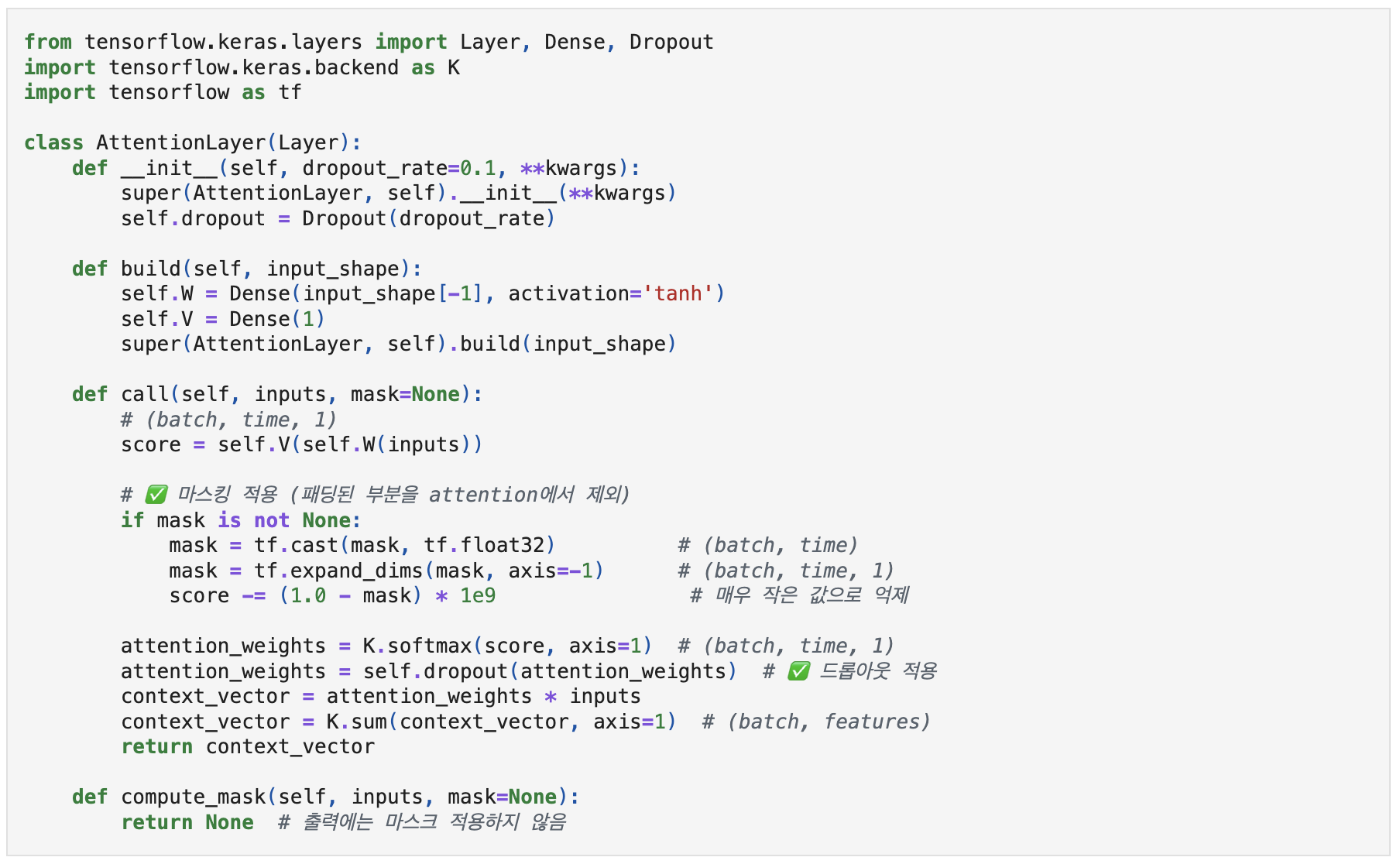
This is not a built-in Keras layer, but a custom Attention layer that I implemented myself.
It learns attention weights based on the word vectors at each time step and generates a context vector that focuses on the most important parts of the sentence.
Internally, it uses two Dense layers (W and V) to compute attention scores, which are then normalized using a softmax function.
When a mask is provided, extremely small values are assigned to the padding positions to prevent the model from attending to them.
Custom Attention Layer
With this combination, I aimed to enhance emotion classification performance, especially for Korean—a language with a flexible word order.
model implementation and design
The model was implemented using TensorFlow and Keras.
Model ArchitectureModel Summary
The model was trained with the following configuration:
Loss Function: Sparse Categorical Crossentropy (well-suited for integer-encoded labels)
Optimizer: Adam (Learning_rate = 0.0003)
Batch Size: 64
Epochs: 50
EarlyStopping & ReduceLROnPlateau : prevent overfitting during training
In addition, to address class imbalance in the dataset, class_weight was used to assign appropriate weights during training.
An ensemble approach was also applied, selecting the best-performing model based on validation accuracy.
Detailed training parameters and performance results will be covered in the next post.
Lessons Learned from Building a Text Classification Model
Designing and implementing the model architecture was a process filled with important decisions and challenges.
One of the biggest difficulties was balancing model complexity with training stability—especially when combining convolutional and recurrent layers with a custom attention mechanism.
It required careful experimentation to ensure that each layer added meaningful value without introducing unnecessary overhead.
In particular, handling the flexible word order of the Korean language posed unique modeling challenges, which led me to choose a BiLSTM + Attention structure that could dynamically capture both local and contextual features.
Through this experience, I realized how crucial it is to design models not only for accuracy, but also for robustness, scalability, and relevance to the linguistic structure of the target domain—principles that are essential in any real-world AI application.
During the chatbot development process, I will write on the topic of the text data preprocessing process.
I will mainly describe the pre-processing process and what I learned, errors, and what I learned in the process.
development process
Pre-processing is the process of loading a dataset and making it available for model training.
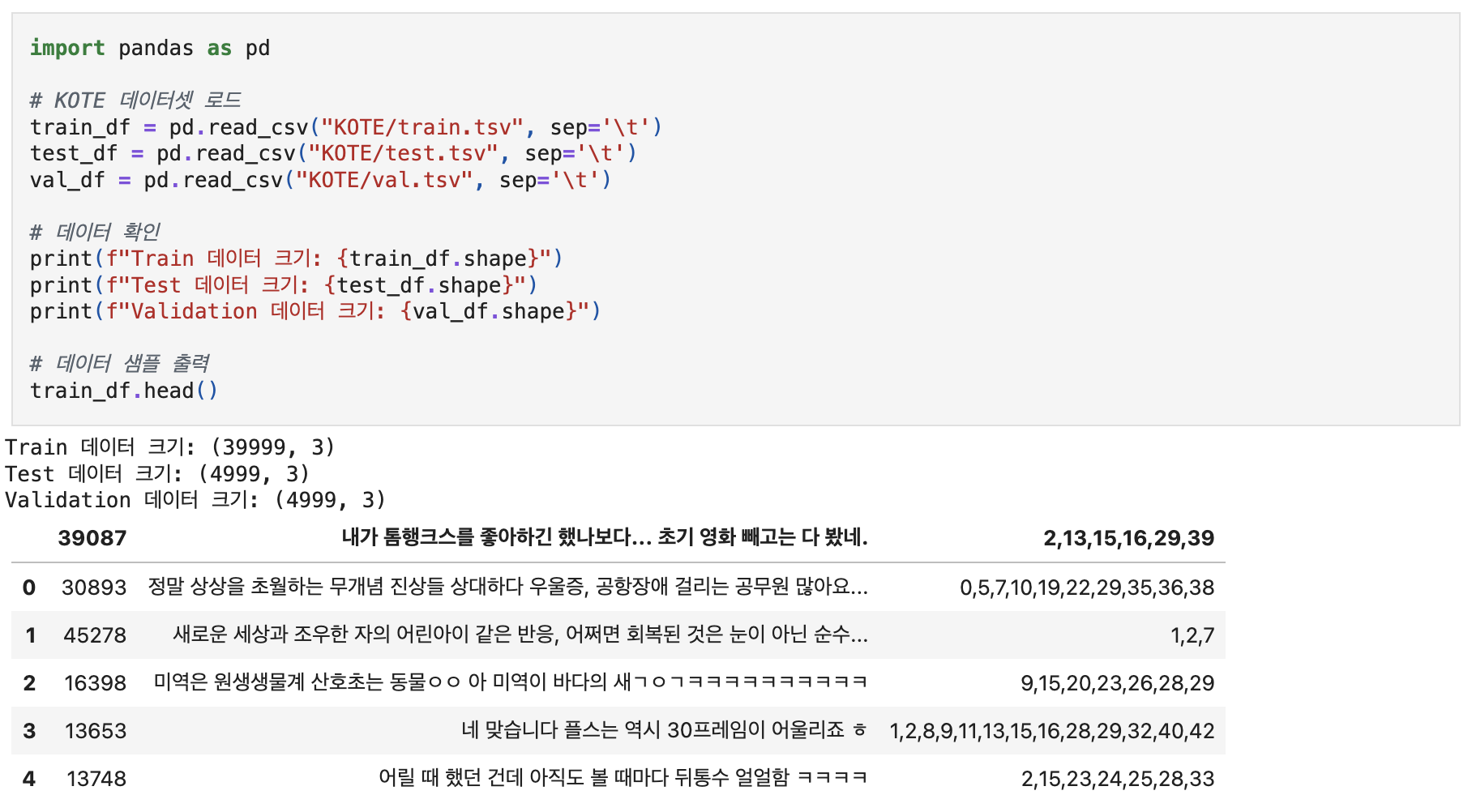
I selected KOTE as the dataset to be used for model training, and the data is stored in .tsv format.
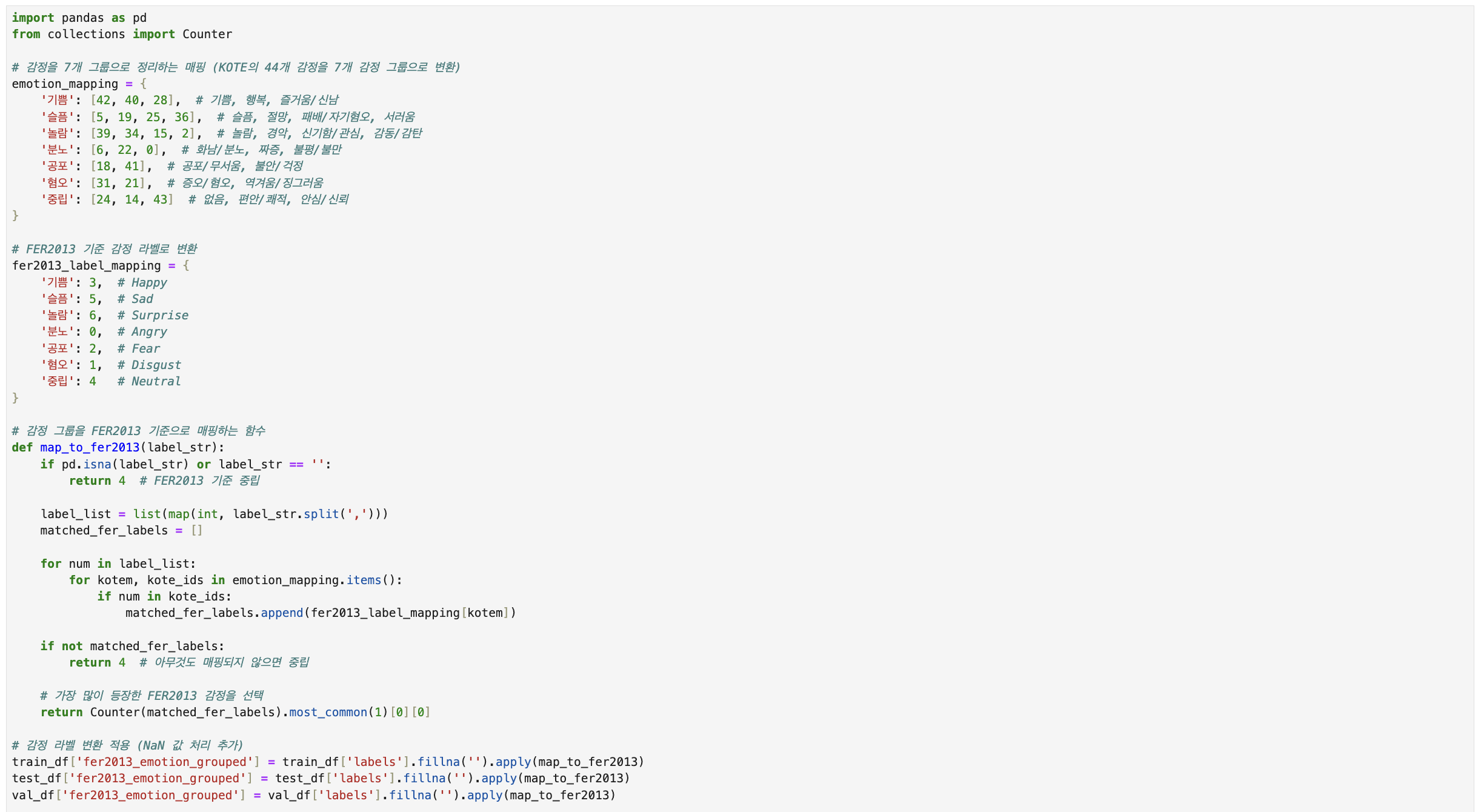
Furthermore, since chatbot development is a multimodal project and will also cover image processing, we have integrated KOTE's 44 emotion labels into seven to fit the labels of Fer2013 - a dataset used for image processing.
The reason for doing this is to prevent the labels from mixing when combining the models in the last final model, so that the correct response is generated.
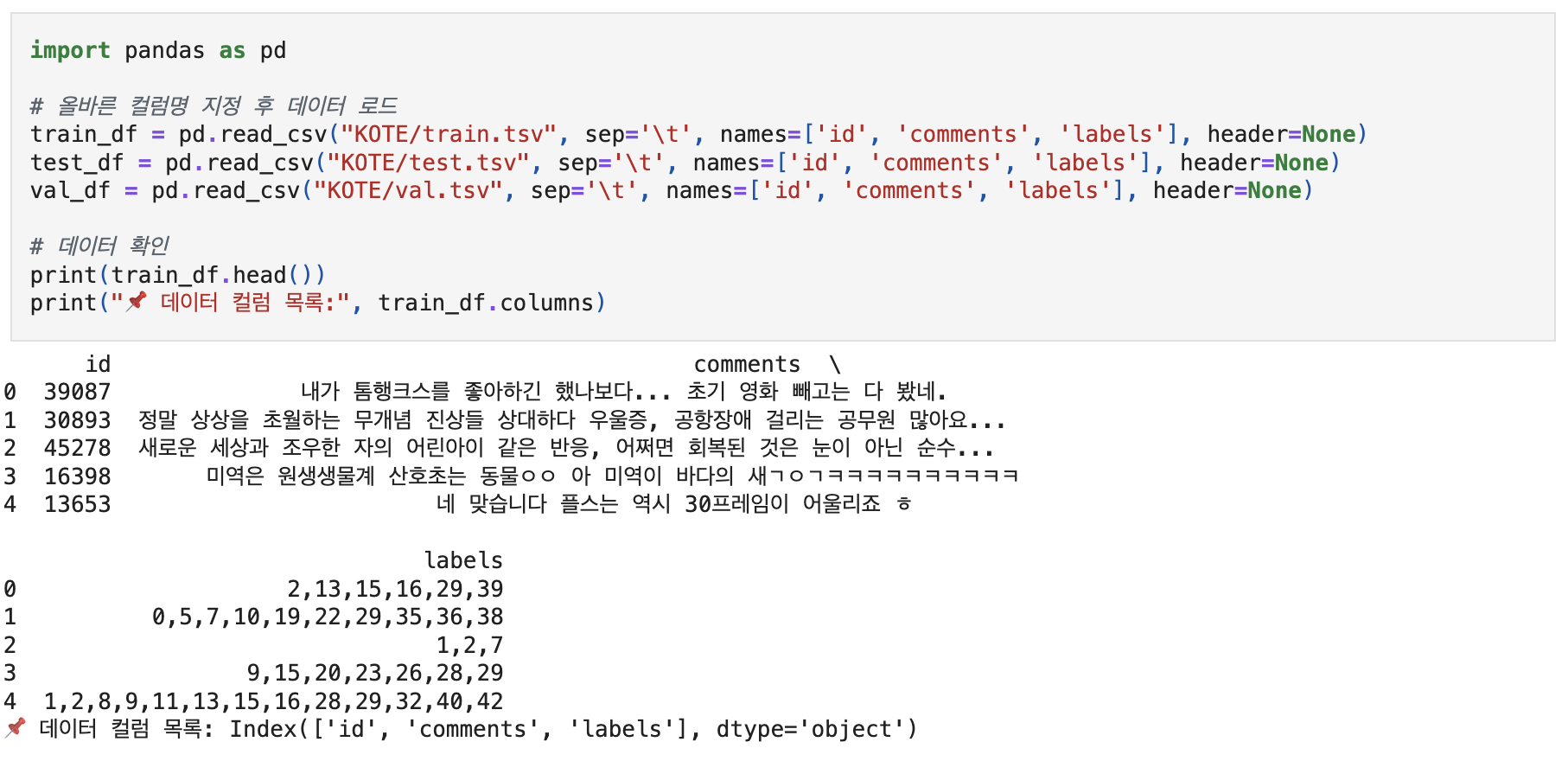
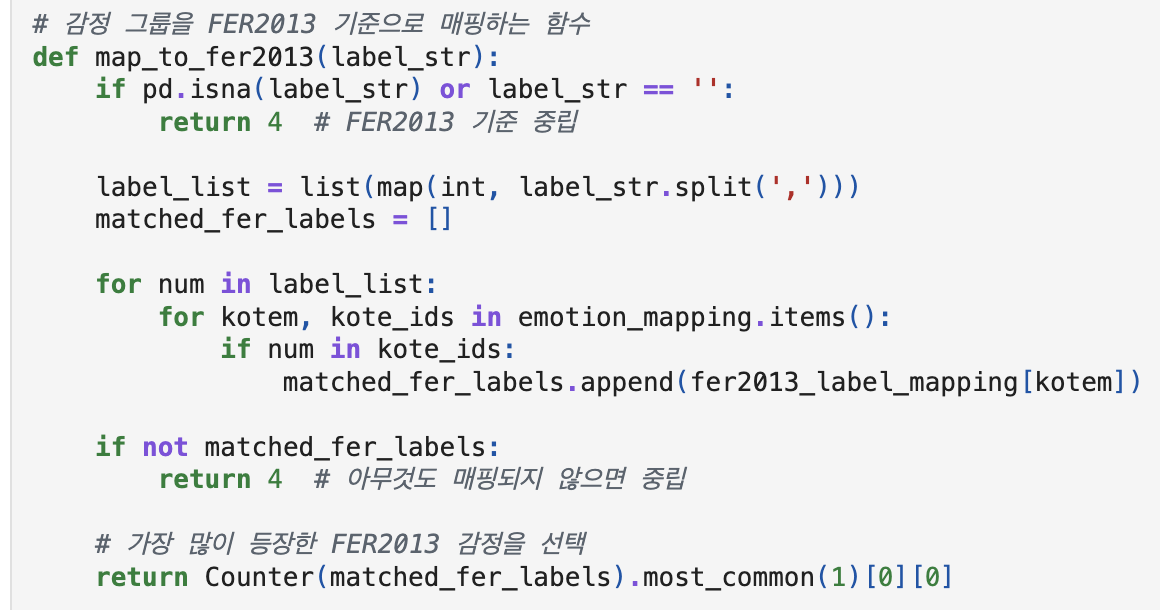
First, I will load and save the KOTE dataset. And mapping was conducted to organize emotions into 7 labels.
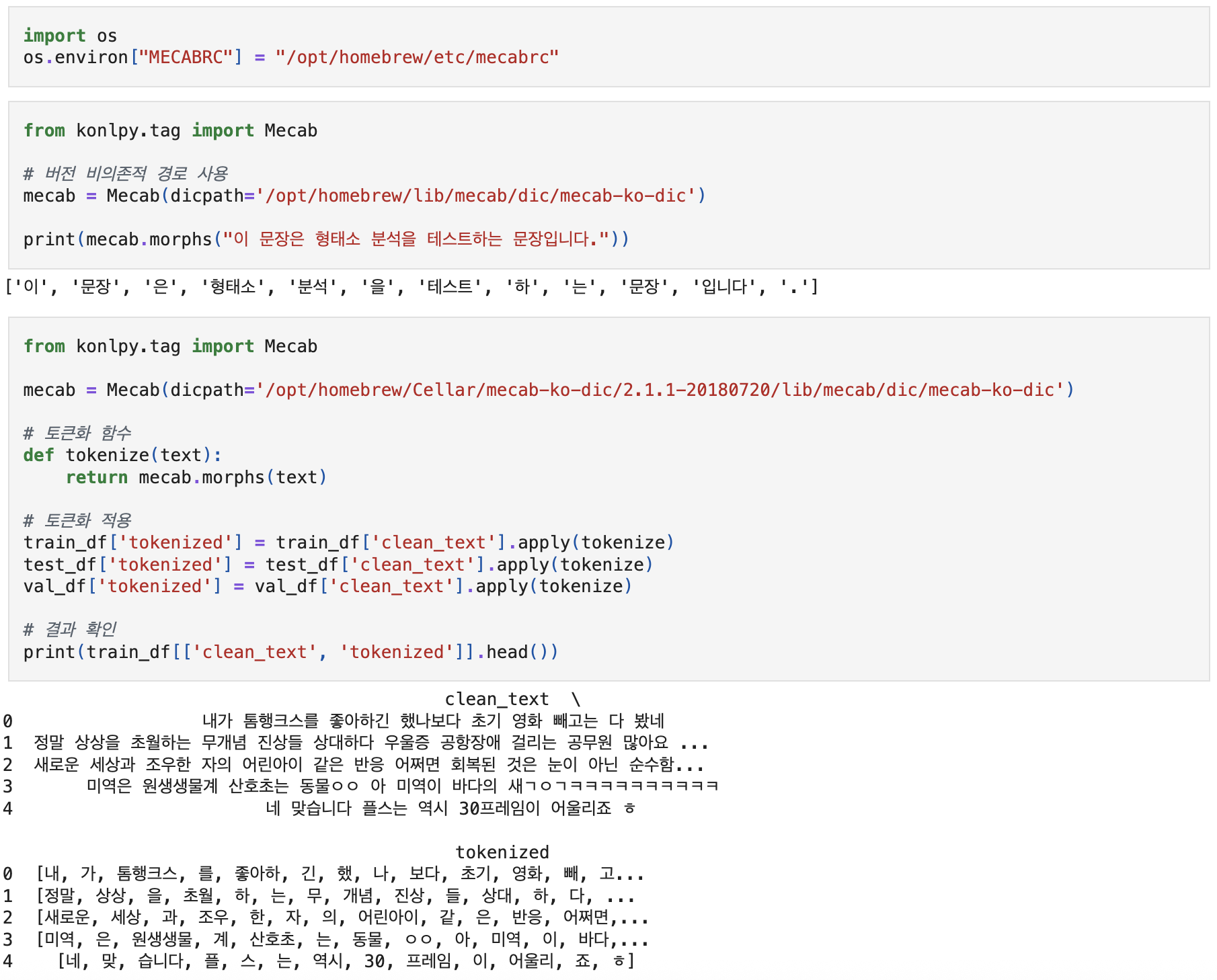
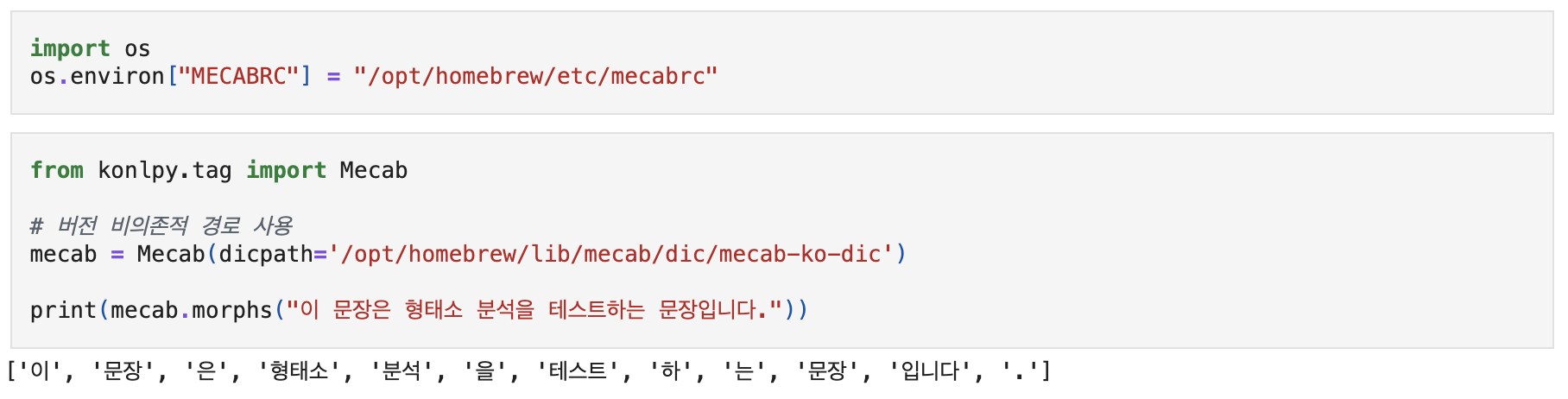
Tokenization is performed in morpheme units, and I used Mekab to tokenize.
Tokenizing with Mecab
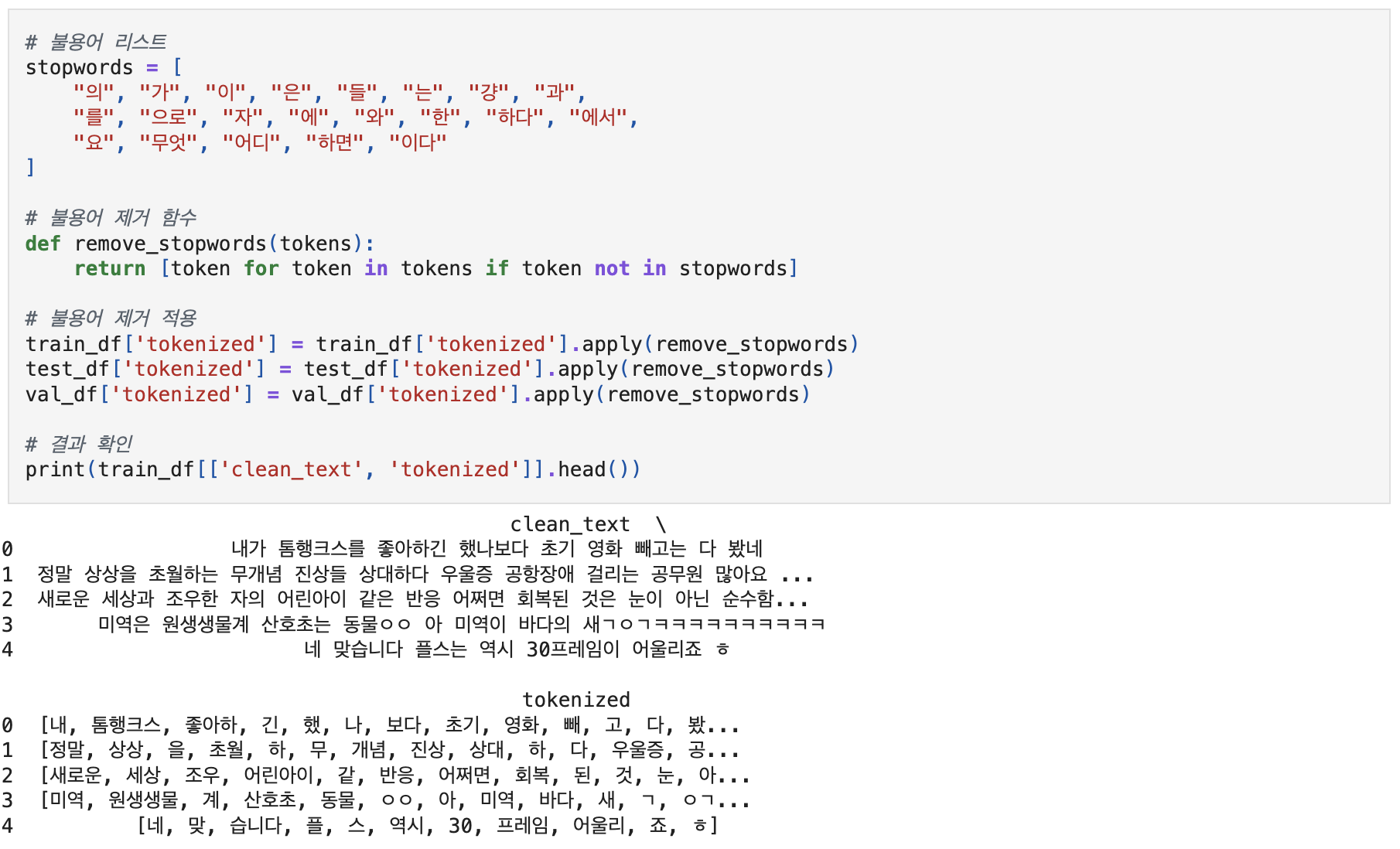
In order for the model to better learn the core content (emotional analogy) of the text, it was intended to exclude unnecessary elements for emotional inference as much as possible. Words that appear frequently in the text, but have no meaning in emotional analysis, were designated and removed as stopwords.
Applying Tokenization with Stopwords
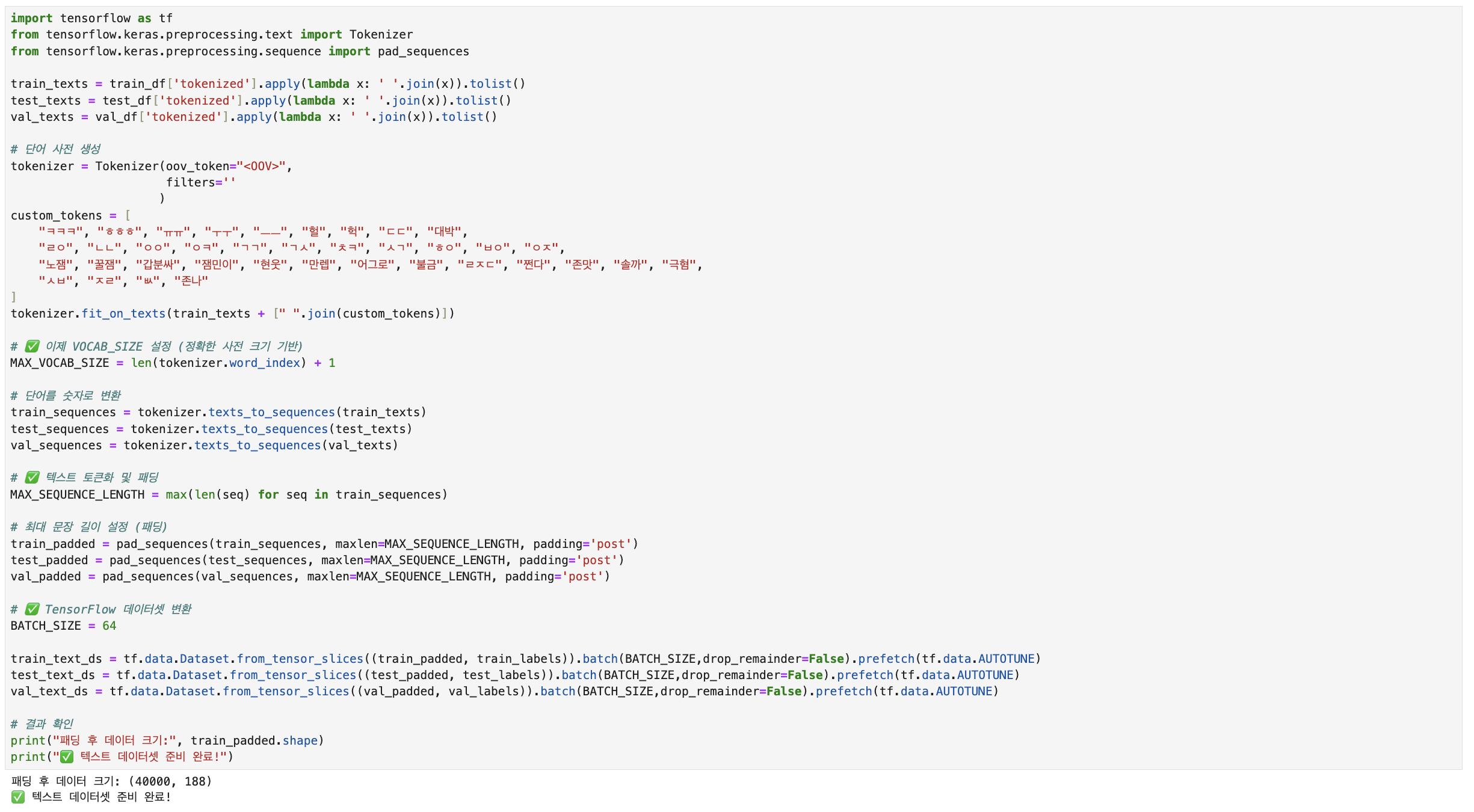
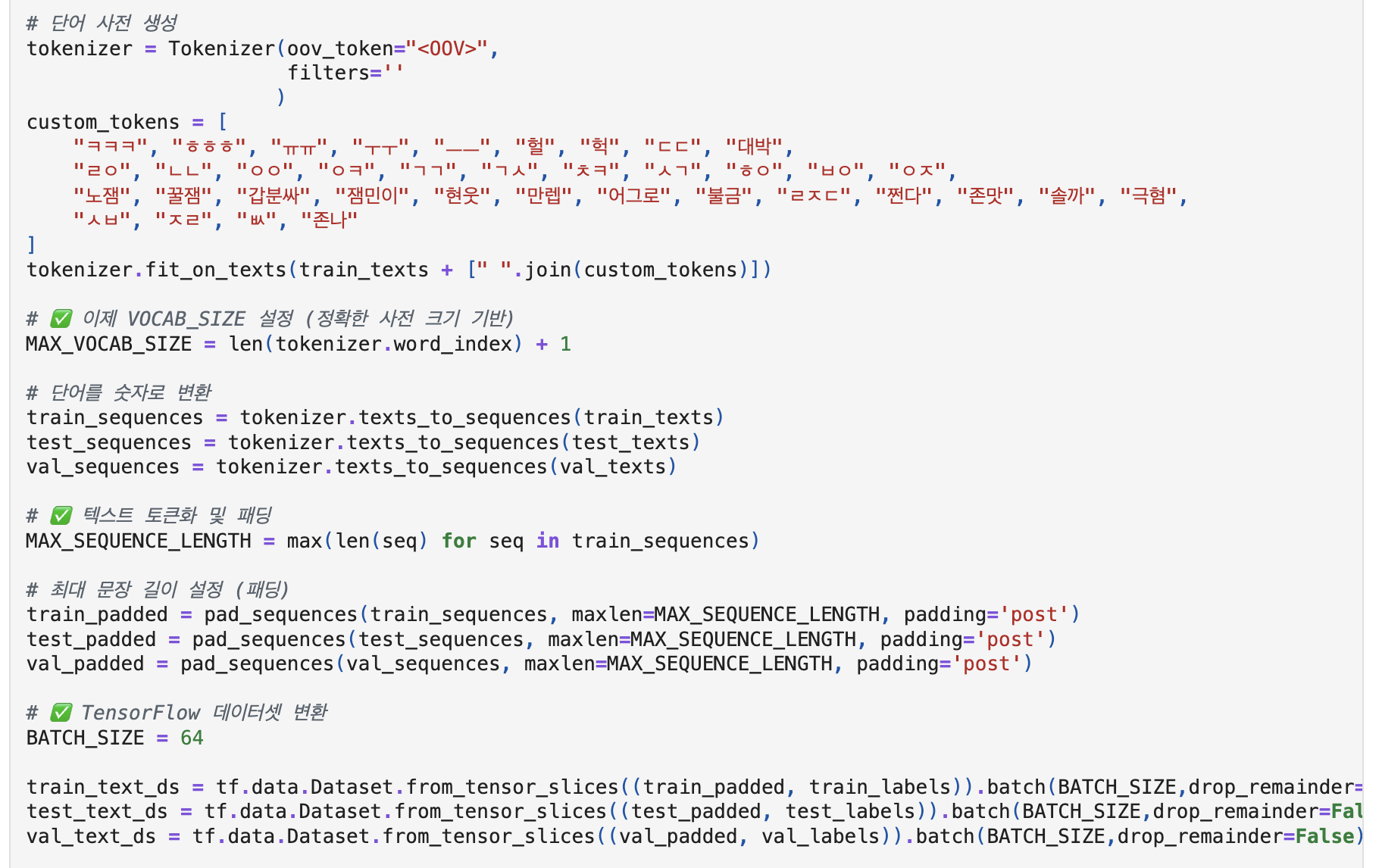
And because the KOTE dataset is based on online comments, custom tokens have been created so that the model can learn correctly about new words(internet slang) that may not be familiar. Integer encoding and padding are performed to convert text data into numbers, and padding is performed to match the input length equally.
Encoding and Padding
Finally, the preprocessing process is completed when the data to be used for model training is converted into an array form and prepared.
Converting Numpy array
errors (Difficulties faced while working on the project)
I thought about how to deal with labels if multiple emotions appear in a single sentence.
For multiple emotions (label strings) in the KOTE dataset, I selected only one main emotion that appeared the most (based on FER2013) and converted it into a single label.
Due to the version compatibility of Mecab and tensorflow and errors in the keras and macOS environments, it was very difficult to import Mecab.
The default path was not recognized, which caused a loading failure. To resolve this, the environment variable MECABRC was manually set, and the dicpath was explicitly specified when initializing the Mecab instance.
In addition, the proportion of OOV (Out-of-Vocabulary) tokens in the dataset was relatively high, introducing noise that interfered with meaningful learning.
To address this issue, the previously limited MAX_VOCAB_SIZE was adjusted based on the number of words learned by the Tokenizer (word_index).
This allowed for a broader vocabulary coverage and significantly reduced the OOV rate.
Challenges and Insights in preprocessing experience
Text data preprocessing is a crucial step for improving both model performance and learning efficiency.
At first, I only had a basic understanding of preprocessing and thought it was important in theory — but I didn’t truly grasp how critical it was in practice.
Because I proceeded with the complacent assumption that “this should be enough,” I didn’t realize the real impact of preprocessing until I reached the model evaluation and performance tuning stages.
I realized that the performance of a model can vary significantly depending on how well the data has been preprocessed. It’s important to thoroughly prepare the data in advance — ensuring that it fits the model architecture and is free of noise.
In this article, we will discuss ways to modify data frames.
Adding columns to a DataFrame
We might want to add new information or perform a calculation based on the data that we already have.
We want to add a column to an existing DataFrame.
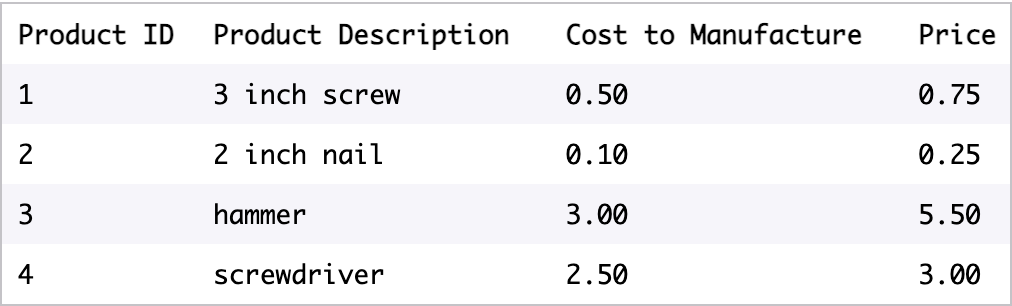
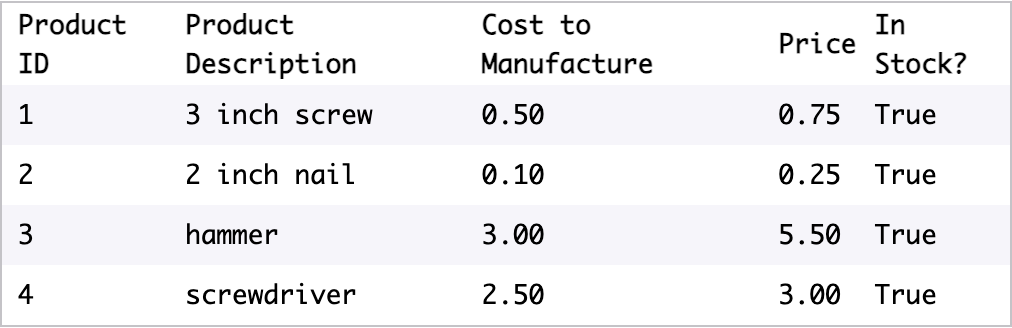
Suppose we own a hardware store called The Handy Woman and have a DataFrame containing inventory information:
One way that we can add a new column is by giving a list of the same length as the existing DataFrame.
Add a Quantity column
We can also add a new column that is the same for all rows in the DataFrame.
Add a In Stock? column
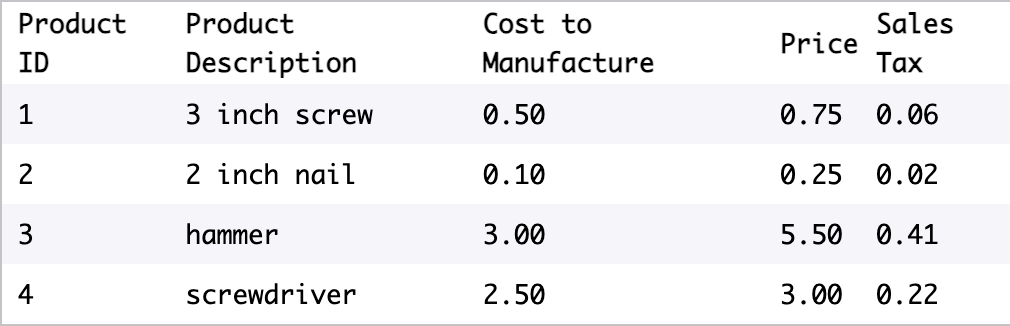
Finally, we can add a new column by performing a function on the existing columns.
Add a Sales Tax
Often, the column that we want to add is related to existing columns.
We can use theapplyfunction to apply a function to every value in a particular column.
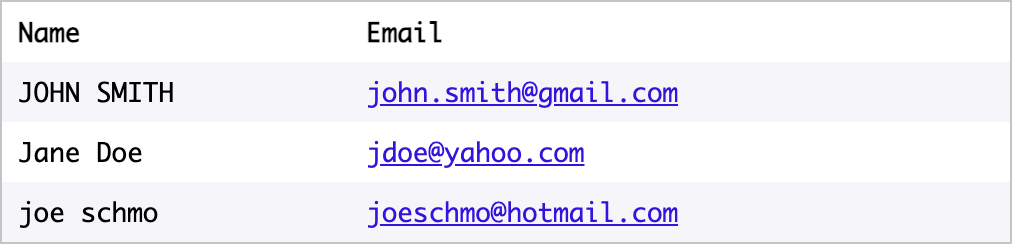
For example, this code overwrites the existing'Name'columns by applying the functionupperto every row in'Name':
df['Name'] = df.Name.apply(str.upper)
beforeafter
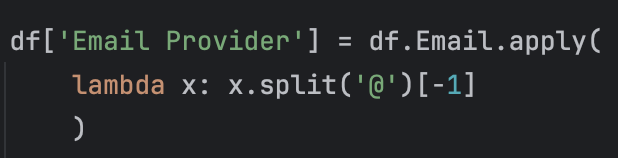
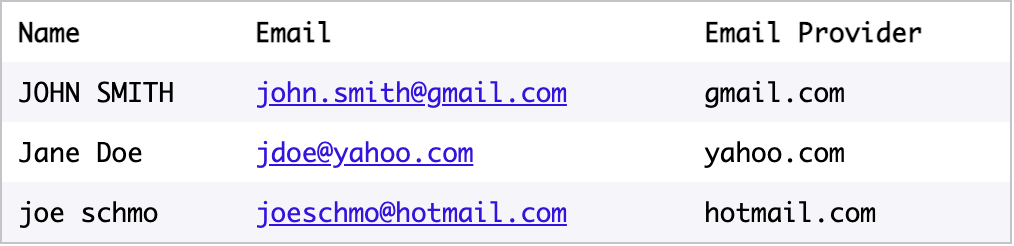
In Pandas, we often use lambda functions to perform complex operations on columns.
Using lambda to apply split methodAdd a Email Provider column
We can also operate on multiple columns at once.
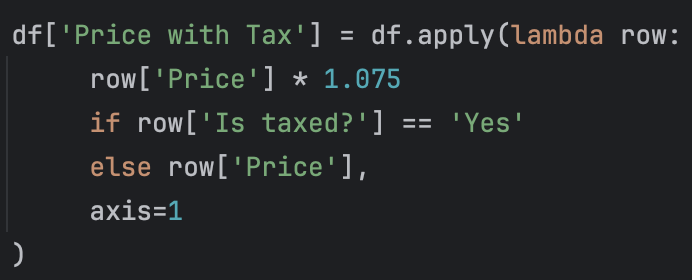
If we useapplywithout specifying a single column and add the argumentaxis=1, the input to our lambda function will be an entire row, not a column.
To access particular values of the row, we use the syntaxrow.column_nameorrow[‘column_name’].
Suppose we have a table representing a grocery list:
If we want to add in the price with tax for each line, we’ll need to look at two columns:PriceandIs taxed?.
IfIs taxed?isYes, then we’ll want to multiplyPriceby 1.075 (for 7.5% sales tax).
IfIs taxed?isNo, we’ll just havePricewithout multiplying it.
To access multiple columns using lambda
Renaming columns
When we get our data from other sources, we often want to change the column names.
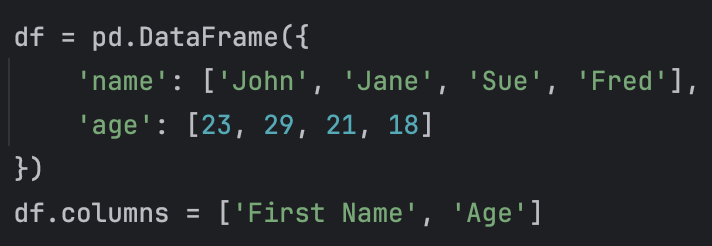
We can change all of the column names at once by setting the .columns property to a different list.
This command edits the existing DataFrame df.
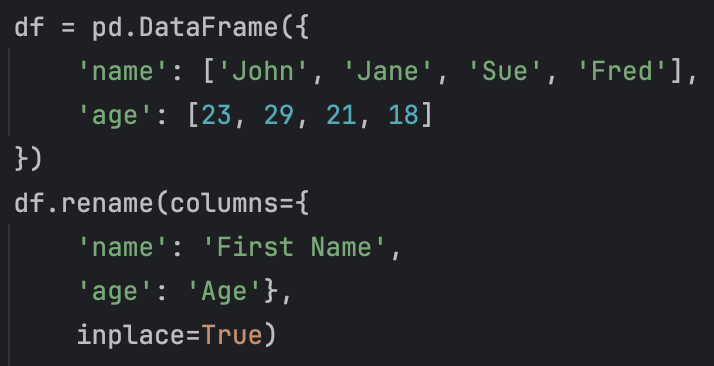
You also can rename individual columns by using the.renamemethod.
The code above will renamenametoFirst NameandagetoAge.
Usingrenamewith only thecolumnskeyword will create anew DataFrame, leaving your original DataFrame unchanged. That’s why we also passed in the keyword argumentinplace=True.
Usinginplace=Truelets us edit theoriginalDataFrame.
There are several reasons why.renameis preferable to .columns:
You can rename just one column
You can be specific about which column names are getting changed (with.columnyou can accidentally switch column names if you’re not careful)
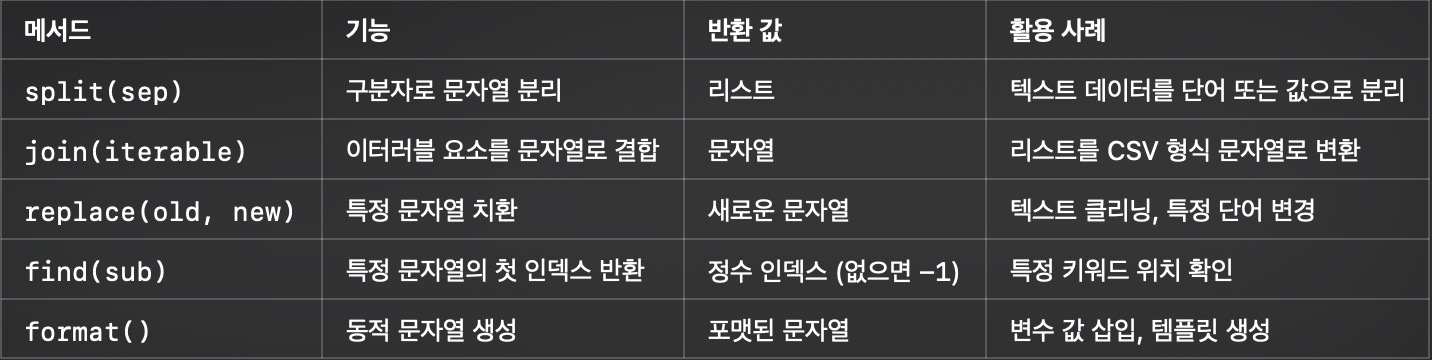
Pandas is a tool for processing data, that is, a module for processing data by converting various types of data into data frames with rows and columns. For example, converting CSV files or SQL databases into tables.
Converted data frames are organized like tables or spreadsheets. Both rows and columns have indexes, and we can perform tasks individually on rows or columns.
Pandas has the advantage of being able to easily change and manipulate data, which has useful functions for processing missing data, performing tasks on columns and rows, and converting data.
Creating Data with Pandas
In order to get access to the Pandas module, we’ll need to install the module and then import it into a Python file.
import pandas as pd
After importing Pandas under the name pd easily, what we will do is to turn the data into a data frame format.
DataFrames have rows and columns. Each column has a name, which is a string. Each row has an index, which is an integer. DataFrames can contain many different data types: strings, ints, floats, tuples, etc.
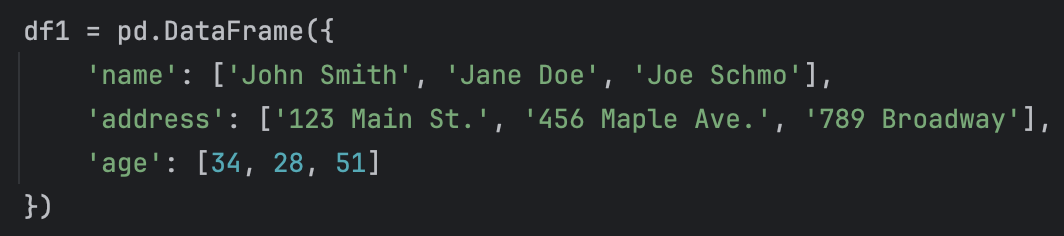
You can pass in a dictionary topd.DataFrame().
pd.DataFrame()
Each key is a column name and each value is a list of column values. The columns must all be the same length or we will get an error.
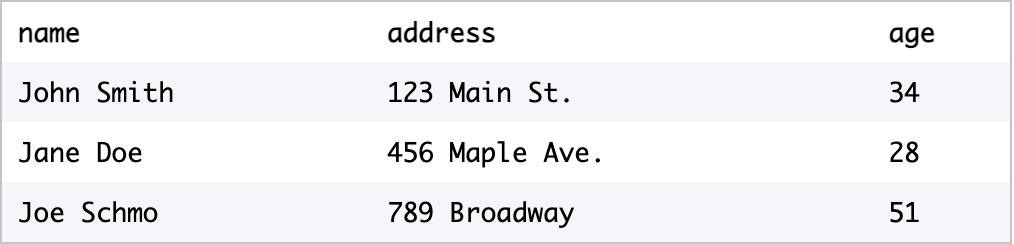
The above command is an example of creating a data frame, and the resulting df1 is as follows.
df1
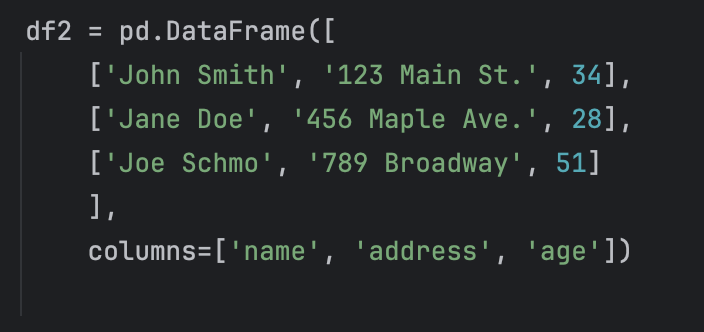
Alternatively, there is a method of making columns separately as follows without using a dictionary.
Now we know how to make a data frame. In this way, we can create our own data frames, but in most cases we will work with large datasets that already exist. One of the most common forms is the Common Seperated Values (CSV).
Loading Data with Pandas
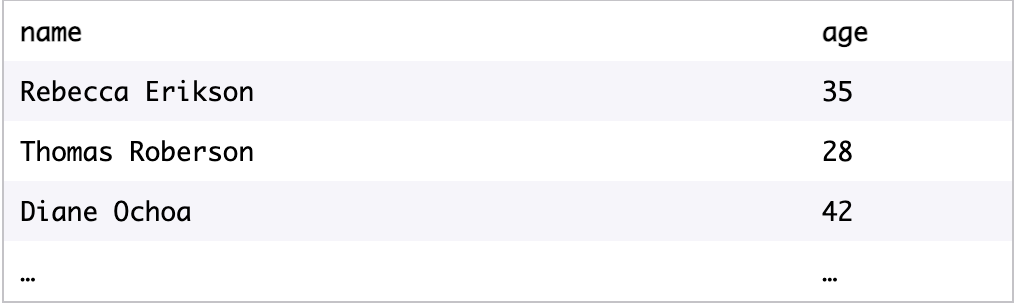
CSV (comma separated values)is a text-only spreadsheet format.
The first row of a CSV contains column headings. All subsequent rows contain values. Each column heading and each variable is separated by a comma:
When we have data in a CSV, you can load it into a Dataframe in Pandas using .read_csv():
read_csv()
In the example above, the.read_csv()method is called. The CSV file calledmy-csv-fileis passed in as an argument.
We can also save data to a CSV, using.to_csv():
to_csv()
when we load a new DataFrame from a CSV, we want to know what it looks like.
If it’s a small DataFrame, you can display it by typingprint(df).
If it’s a larger DataFrame, it’s helpful to be able to inspect a few items without having to look at the entire DataFrame.
The method.head()gives the first 5 rows of a DataFrame. If you want to see more rows, you can pass in the positional argumentn.
The methoddf.info()gives some statistics for each column.
Selecting Data with Pandas
Now we know how to create and load data.
Let’s select parts of those datasets that are interesting or important to our analyses.
Suppose we have the DataFrame calledcustomers, which contains the ages of your customers:
DataFrame Customers
There are two possible syntaxes for selecting all values from a column:
Select the column as if we were selecting a value from a dictionary using a key. In our example, we would typecustomers['age']to select the ages.
If the name of a column follows all of the rules for a variable name (doesn’t start with a number, doesn’t contain spaces or special characters, etc.), then we can select it using the following notation:df.MySecondColumn. In our example, we would typecustomers.age.
When we have a larger DataFrame, we might want to select just a few columns.
To select two or more columns from a DataFrame, we use a list of the column names.
new_df = orders[['instance_one', 'instance_two']]
If you want to select a particular row rather than a column, use the iloc[] method.
orders.iloc[2] : It refers to the third row of the order data frame.
we can also select multiple rows from a DataFrame.
Here are some different ways of selecting multiple rows:
orders.iloc[3:7]would select all rows starting at the 3rd row and up to butnot includingthe 7th row (i.e., the 3rd row, 4th row, 5th row, and 6th row)
orders.iloc[:4]would select all rows up to, butnot includingthe 4th row (i.e., the 0th, 1st, 2nd, and 3rd rows)
orders.iloc[-3:]would select the rows starting at the 3rd to last row and up to andincludingthe final row
You can select a subset of a DataFrame by using logical statements:
df[df.MyColumnName == desired_column_value]
Suppose we want to select all rows where the customer’s age is 30. We would use:
df[df.name == 30]
We can also use other logical statements in the same way and combine multiple logical statements, as long as each statement is in parentheses.
For instance, suppose we wanted to select all rows where the customer’s age was under 30orthe customer’s name was “Martha Jones”:
df[(df.age < 30) | df.name == 'Martha Jones')]
Suppose we want to select the rows where the customer’s name is either “Martha Jones”, “Rose Tyler” or “Amy Pond”.
We can use theisincommand to check thatdf.nameis one of a list of values:
When we select a subset of a DataFrame using logic, we end up with non-consecutive indices.
This makes it hard to use.iloc().
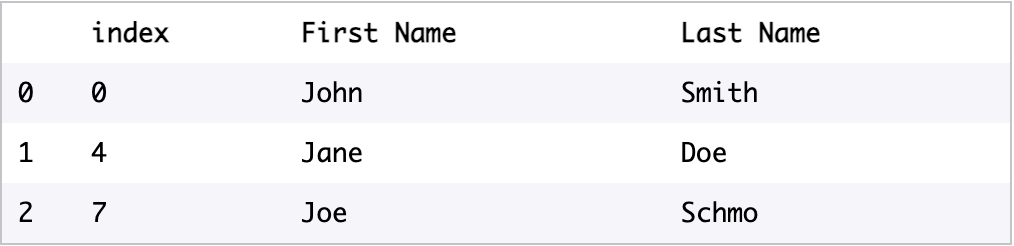
We can fix this using the method.reset_index(). For example, here is a DataFrame calleddfwith non-consecutive indices:
Before using .reset_index()
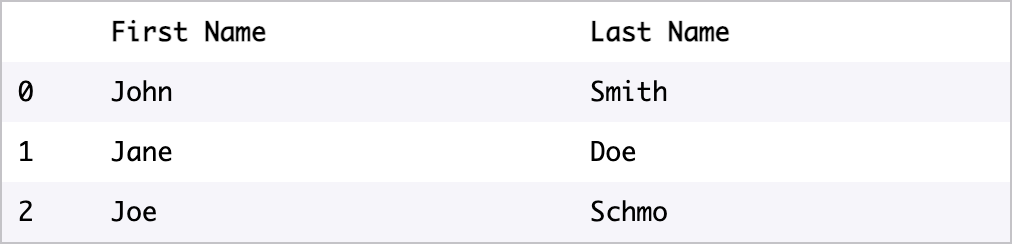
If we use the commanddf.reset_index(), we get a new DataFrame with a new set of indices:
After using .reset_index()
Note that the old indices have been moved into a new column called'index'. Unless you need those values for something special, it’s probably better to use the keyworddrop=Trueso that you don’t end up with that extra column. If we run the commanddf.reset_index(drop=True), we get a new DataFrame that looks like this:
reset_index(drop=True)
Using.reset_index()will return a new DataFrame, but we usually just want to modify our existing DataFrame. If we use the keywordinplace=Truewe can just modify our existing DataFrame.
df.reset_index(drop=True, inplace=True)
It helps voiding the creation of a new DataFrame and thus improbing memory efficiency.
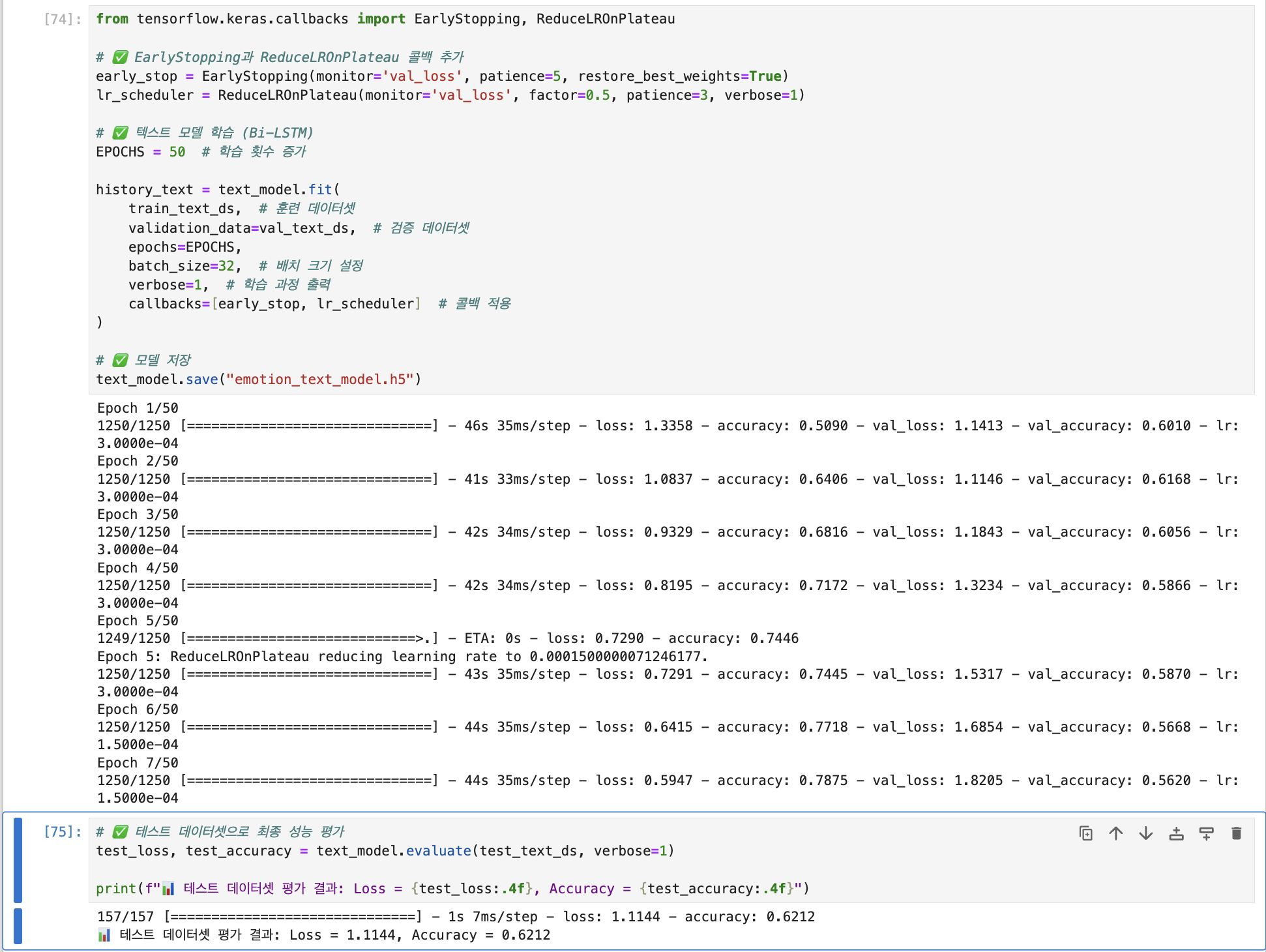
Before evaluating the performance with the test dataset, we first judged whether the model was overfitting through two training sessions.
When trained with training and validation datasets in the first model, Performance of Accuracy = 0.8257 and val_accuracy = 0.5418.
When trained with training and validation datasets in the second model, The performance of Accuracy = 0.9244, val_accuracy = 0.3894 was shown.
As we learned more, the accuracy of the training set increased and the accuracy of the verification set decreased This suggests that the model is overfitting the training data.
Data preprocessing and hyperparameter tuning were modified to prevent overfitting of the model and increase the accuracy of the test set.
The learning rate and dropout figures were considered.However, the epoch was set at the same time as 50, early stopping and call back.
1. Modifying the list of unused terminology
In the process of tokenizing text data, unnecessary words are removed through a list of terminology, allowing the model to infer emotions from the text more effectively.
The terminology was mainly composed of investigations, connection words, and verbs that did not contain meaning in the word itself.
Since the text recognition model is made possible to grasp the context of sentences using a hybrid model combining CNN and Bi-LSTM, conjunctions that can infer the context are excluded from the list.
As a result, the accuracy of the test set increased from 0.5670 (before modification) to 0.5907 (after modification).
2. Modify Dropout
Although the test set's accuracy rose to 0.5907 with a slight modification to the non-verbal list, we were still concerned about the possibility of overfitting considering that the training set is still high and the verification and test sets are low.
Therefore, the number and value of dropout layers were considered as a solution.
Among the number and figures of dropout layers, it was questioned which factors were more influential in preventing overfitting, and to find out, the degree of overfitting was determined by modifying the value of the dropout from 0.4 to 0.5 instead of reducing the dropout by one in the existing model.
Before modificaton: 0.5907
After modification (down by 1 Dropout layer, up to 0.5 Dropout value): 0.6162
When comparing the pre-correction accuracy with the post-correction accuracy, The accuracy of the training set decreased, the accuracy of the verification set increased, and the accuracy of the test set also increased.
From this, it may vary depending on the situation of each model, but in the current model, it was found that the number of dropout layers has a greater impact on overfitting prevention.
3. Modifying the Learning Rate
Existing Learning Rate : 0.0001
Test accuracy when learning rate is 0.0003: 0.6162 -> 0.6212
Test accuracy when learning rate is 0.0005: 0.6212 -> 0.6104
Test accuracy when learning rate is 0.001: 0.6104 -> 0.6152
When the number increased from the existing learning rate of 0.0001 to 0.0003, the test accuracy increased After that, even if the learning rate increased, there was little difference in accuracy.Through this, the model was trained assuming an optimal learning rate of 0.0003.